AWS Settings
StormTunnel → Settings (Cmd+,) → AWS tab
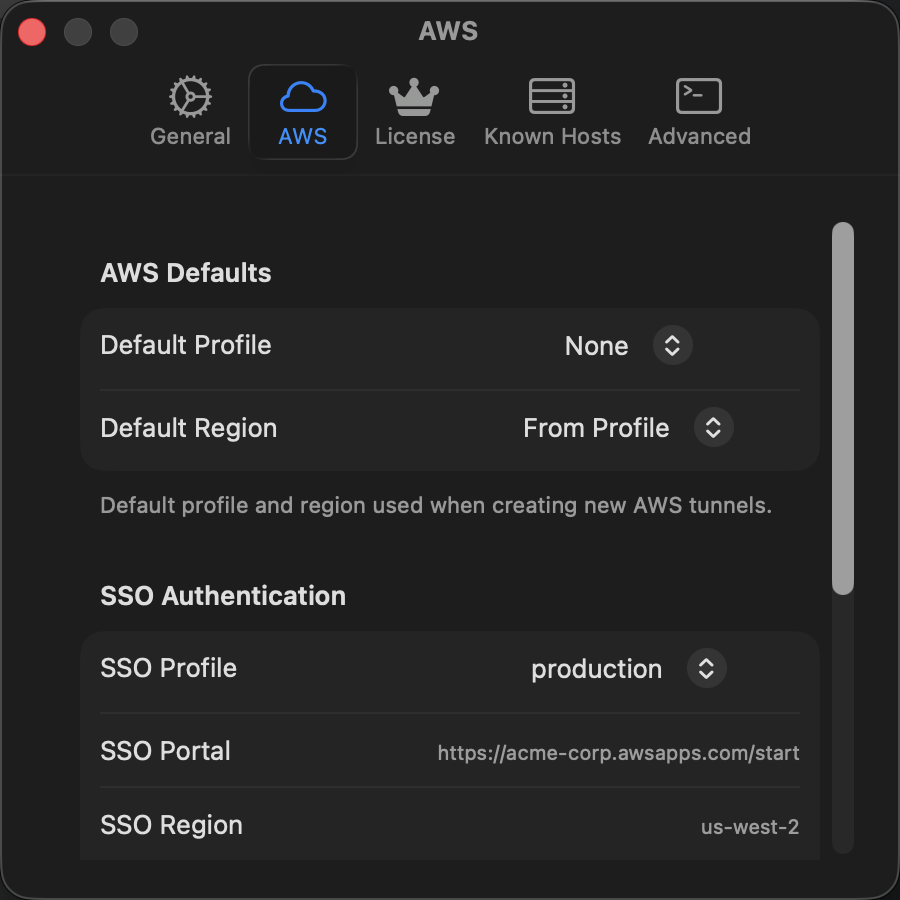
Configure AWS credentials and Single Sign-On for AWS Session Manager tunnels.
Credentials
| Setting | Description |
|---|---|
| AWS Profile | Select a profile from ~/.aws/config and ~/.aws/credentials |
| Credentials Status | Shows whether credentials are valid, checking, or invalid |
| Region | Default AWS region for Session Manager tunnels (overridable per tunnel) |
Supported profile types: standard credentials, temporary credentials (with session token), SSO profiles, and assume-role profiles.
If your profile doesn't appear, run aws configure in Terminal and restart StormTunnel.
Credentials Status
| Status | Meaning |
|---|---|
| Connected | Credentials valid and ready |
| Checking | Validating credentials |
| Invalid | Missing, expired, or incorrect |
AWS Single Sign-On (SSO)
Use browser-based SSO authentication instead of storing access keys.
| Setting | Description |
|---|---|
| AWS SSO | Enable SSO authentication |
| SSO Start URL | Your organization's SSO URL (e.g., https://your-org.awsapps.com/start) |
| SSO Region | Region for SSO endpoint (usually us-east-1) |
To authenticate: enable the toggle, fill in the fields, click Authenticate with SSO, and sign in through your browser.
| SSO Status | Meaning |
|---|---|
| Authenticated | Token valid, ready to use |
| Token Expiring Soon | Will refresh automatically |
| Token Expired | Click Re-authenticate |
Required Permissions
Your AWS user or role needs these IAM permissions for Session Manager tunnels:
{
    "Version": "2012-10-17",
    "Statement": [
        {
            "Effect": "Allow",
            "Action": [
                "ssm:StartSession",
                "ssm:TerminateSession",
                "ec2:DescribeInstances"
            ],
            "Resource": "*"
        }
    ]
}
Click Check Permissions to validate your access.
Cross-Account Access
To access resources in another AWS account, create an assume-role profile in ~/.aws/config:
[profile cross-account]
role_arn = arn:aws:iam::987654321098:role/CrossAccountRole
source_profile = default
Then select this profile in AWS Settings.
Security
- Credentials are stored in standard AWS locations (
~/.aws/) - SSO tokens are stored in macOS Keychain (encrypted)
- Credentials are never written to logs or transmitted outside AWS APIs