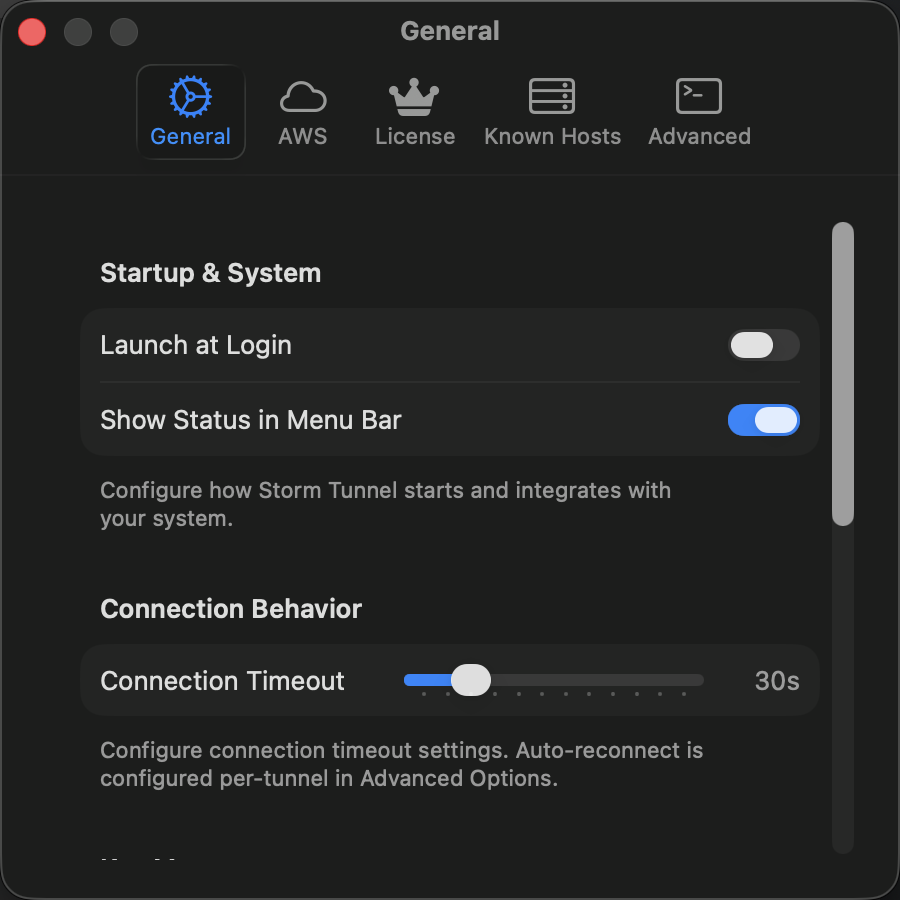
General SettingsΒΆ
The General Settings tab provides basic application configuration options that control StormTunnel's startup behavior, connection settings, and notification preferences.
π Startup & SystemΒΆ
Launch at LoginΒΆ
- Control: Toggle switch
- Default: Disabled
- Function: Automatically starts StormTunnel when the user logs into macOS
- Implementation: Uses
LaunchAtLoginManagerwith macOS Login Items API - Security: Requires user permission to modify login items
Show Status in Menu BarΒΆ
- Control: Toggle switch
- Default: Enabled
- Function: Displays connection status and quick actions in the macOS menu bar
- Features:
- Connection status indicator (active/inactive/error)
- Quick access to common actions
- Connection summary information
- Implementation: Managed by
MenuBarManagerwith immediate visibility updates
π Connection BehaviorΒΆ
Connection TimeoutΒΆ
- Control: Slider with value display
- Range: 10-120 seconds (in 10-second increments)
- Default: 30 seconds
- Function: Maximum time to wait when establishing SSH connections
- Applies to: All tunnel types (Standard SSH, AWS Session Manager, Dynamic Port Forwarding)
- Technical Details:
- Performance Impact:
- Lower values (10-20s): Faster failure detection but may timeout on slow connections
- Higher values (60-120s): Better for unreliable networks but slower error reporting
π Key ManagementΒΆ
Show Stale Validation WarningsΒΆ
- Control: Toggle switch
- Default: Enabled
- Function: Warn users about SSH keys that haven't been validated in over 30 days
- Security Purpose: Encourages regular key validation and rotation
- Warning Criteria:
- Key exists but hasn't been used for validation
- Last validation date > 30 days ago
- Key appears in SSH configuration but validation status is unknown
- Implementation: Tracked in
SSHKeymodel withlastValidatedtimestamp
π NotificationsΒΆ
StormTunnel uses an intelligent notification system that routes messages appropriately based on app state and user preferences.
Prefer Toasts When App is ActiveΒΆ
- Control: Toggle switch
- Default: Enabled
- Function: Show in-app toast notifications when StormTunnel window is visible
- Behavior:
- Enabled: Toasts appear in app window for non-critical notifications
- Disabled: All notifications go to system notification center
- Toast Features:
- Auto-dismiss after configurable duration
- Non-intrusive overlay positioning
- Action buttons for immediate response
- Stacking for multiple notifications
Show System NotificationsΒΆ
- Control: Toggle switch
- Default: Enabled
- Function: Display macOS notification center banners when app is in background
- System Integration:
- Uses
UNUserNotificationCenterfor native notifications - Respects macOS notification preferences
- Works with Do Not Disturb mode
- Uses
- Background Detection: Automatically detects when app loses focus
Always Show Critical Errors as System NotificationsΒΆ
- Control: Toggle switch
- Default: Enabled
- Function: Forces critical errors to use system notifications regardless of app state
- Dependency: Requires "Show system notifications" to be enabled
- Critical Error Types:
- Authentication failures
- Connection security warnings
- License expiration alerts
- System-level errors
- Behavior: Shows both toast (if app active) and system notification
Enable Notification SoundsΒΆ
- Control: Toggle switch
- Default: Enabled
- Function: Play sound effects for notifications and alerts
- Sound Types:
- Connection Success: Positive chime
- Connection Error: Warning tone
- Critical Error: Alert sound
- License Expiry: Reminder chime
- System Integration: Uses
NSSoundwith respect to system volume settings
π― Notification Routing LogicΒΆ
The notification system uses intelligent routing based on multiple factors:
Decision MatrixΒΆ
| App State | Toast Preference | System Notification | Result |
|---|---|---|---|
| Active | Enabled | Enabled | Toast only (non-critical), System + Toast (critical) |
| Active | Enabled | Disabled | Toast only |
| Active | Disabled | Enabled | System only |
| Active | Disabled | Disabled | No notifications |
| Background | Any | Enabled | System only |
| Background | Any | Disabled | No notifications |
Implementation DetailsΒΆ
// Notification routing logic
func routeNotification(_ message: UserMessage) {
let isAppActive = NSApplication.shared.isActive
let preferToasts = preferToastsWhenActive
let showSystem = showSystemNotifications
let isCritical = message.severity == .critical
let showToast = isAppActive && preferToasts && !isCritical
let showSystemNotification = (!isAppActive || !preferToasts || isCritical) && showSystem
if showToast {
ToastManager.shared.show(message)
}
if showSystemNotification {
SystemNotificationService.shared.show(message)
}
}
π§ Technical ImplementationΒΆ
Settings PersistenceΒΆ
All General Settings are stored using UserDefaultsManager with immediate persistence:
// Launch at Login
UserDefaultsManager.shared.set(isLaunchAtLoginEnabled, forKey: "launchAtLogin")
// Menu Bar Status
UserDefaultsManager.shared.set(showStatusInMenuBar, forKey: "ui.showStatusInMenuBar")
// Connection Timeout
UserDefaultsManager.shared.set(Int(connectionTimeout), forKey: "settings.connectionTimeout")
// Notification Preferences
UserDefaultsManager.shared.set(preferToastsWhenActive, forKey: "preferToastsWhenActive")
UserDefaultsManager.shared.set(showSystemNotifications, forKey: "showSystemNotifications")
UserDefaultsManager.shared.set(alwaysShowCriticalAsSystem, forKey: "alwaysShowCriticalAsSystem")
UserDefaultsManager.shared.set(enableNotificationSounds, forKey: "notifications.enableSounds")
Real-time UpdatesΒΆ
Settings changes take effect immediately:
- Menu Bar: Visibility updates instantly when toggled
- Connection Timeout: Applies to new connections immediately
- Notifications: Routing preferences update in real-time
- Launch at Login: Modifies system login items immediately
Default ValuesΒΆ
First-time users get sensible defaults:
// Default configuration for new installations
struct GeneralSettingsDefaults {
static let launchAtLogin = false
static let showStatusInMenuBar = true
static let connectionTimeout = 30.0
static let preferToastsWhenActive = true
static let showSystemNotifications = true
static let alwaysShowCriticalAsSystem = true
static let enableNotificationSounds = true
static let showStaleValidationWarnings = true
}
π¨ User ExperienceΒΆ
Interface DesignΒΆ
- Grouped Form Style: Uses macOS native form styling
- Help Text: Contextual help available for all controls
- Section Headers: Clear categorization of settings
- Footer Text: Explanatory text for each section
AccessibilityΒΆ
- VoiceOver Support: All controls properly labeled
- Keyboard Navigation: Full tab navigation support
- High Contrast: Respects system contrast settings
- Reduced Motion: Animations respect accessibility preferences
Performance ConsiderationsΒΆ
- Immediate Persistence: Settings save instantly without UI delay
- Efficient Updates: Only affected services receive change notifications
- Memory Management: Lightweight property observers prevent memory leaks
π Security & PrivacyΒΆ
Data ProtectionΒΆ
- Local Storage: All settings stored locally in UserDefaults
- No Telemetry: General settings don't transmit any data
- Permission Respect: All system integrations require explicit user permission
Privacy FeaturesΒΆ
- Notification Control: Users control exactly what notifications they see
- Background Behavior: Clear indication of when app works in background
- Key Validation: Optional stale key warnings enhance security awareness
π Related DocumentationΒΆ
Last Updated: December 17, 2025 Implementation Files: GeneralSettingsView.swift, SettingsViewModel.swift